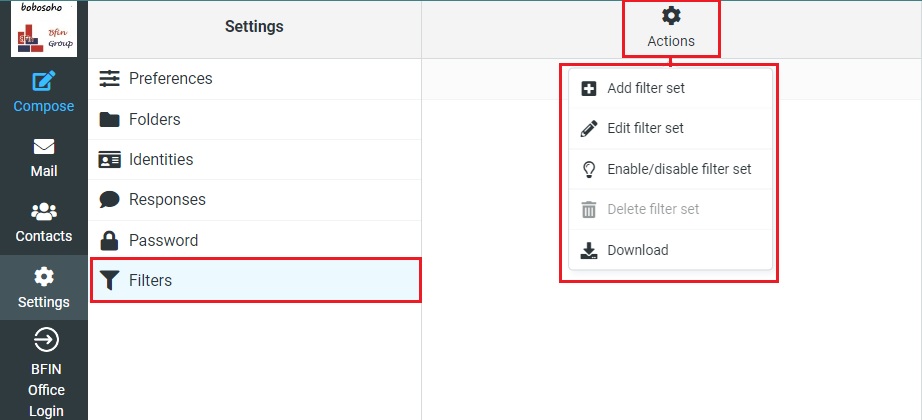
In this option you can control incoming & outgoing messages from your Bobosohomail by creating some simple rules, to enable this feature click on the Create (+) icon, and a menu will appear
Filter name
In this option, you can set the filter name as you want
Filter enabled
You can simply enable or disable the filter option from here.
Scope
In this option you can manage the rules you are creating for your mailbox.
Rules
In this option, you can set the filter for your mailbox, and you can control emails by Subject, From, To, the message body, specific word, or content. You should add the email which you want to block to the next box.
You can increase the rules by clicking on the next (+) of the gear icon
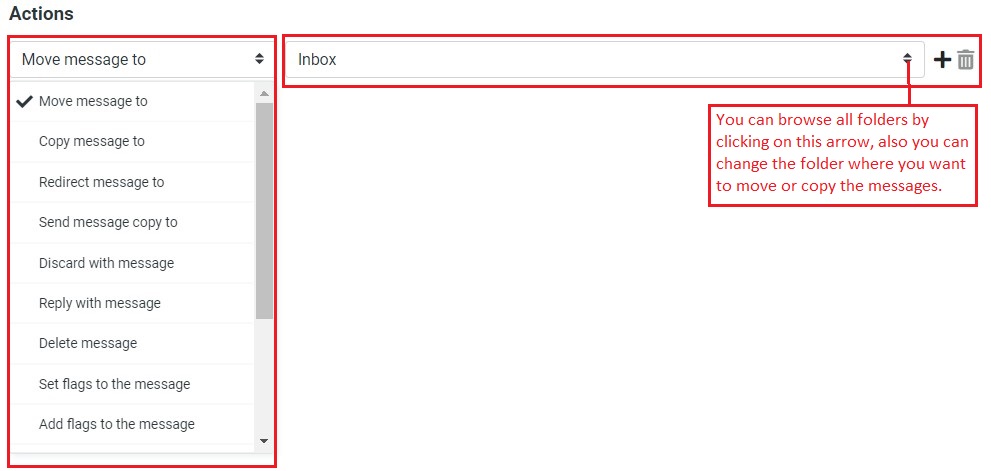
Actions
Once the rules are set up successfully you have to set the actions after the email is filtered. You can choose multiple options like move to/copy to/restricted to/flagged to/send message copy to another email or simply you can move or copy to your desired mailbox folder.
There is another quick action button for the filter option, you can toggle up/down with a single click. The option located on the right top of the toolbar, you can easily turn off or turn on the filter option, add/edit/delete and download the filter easily.